Updated Design Comps
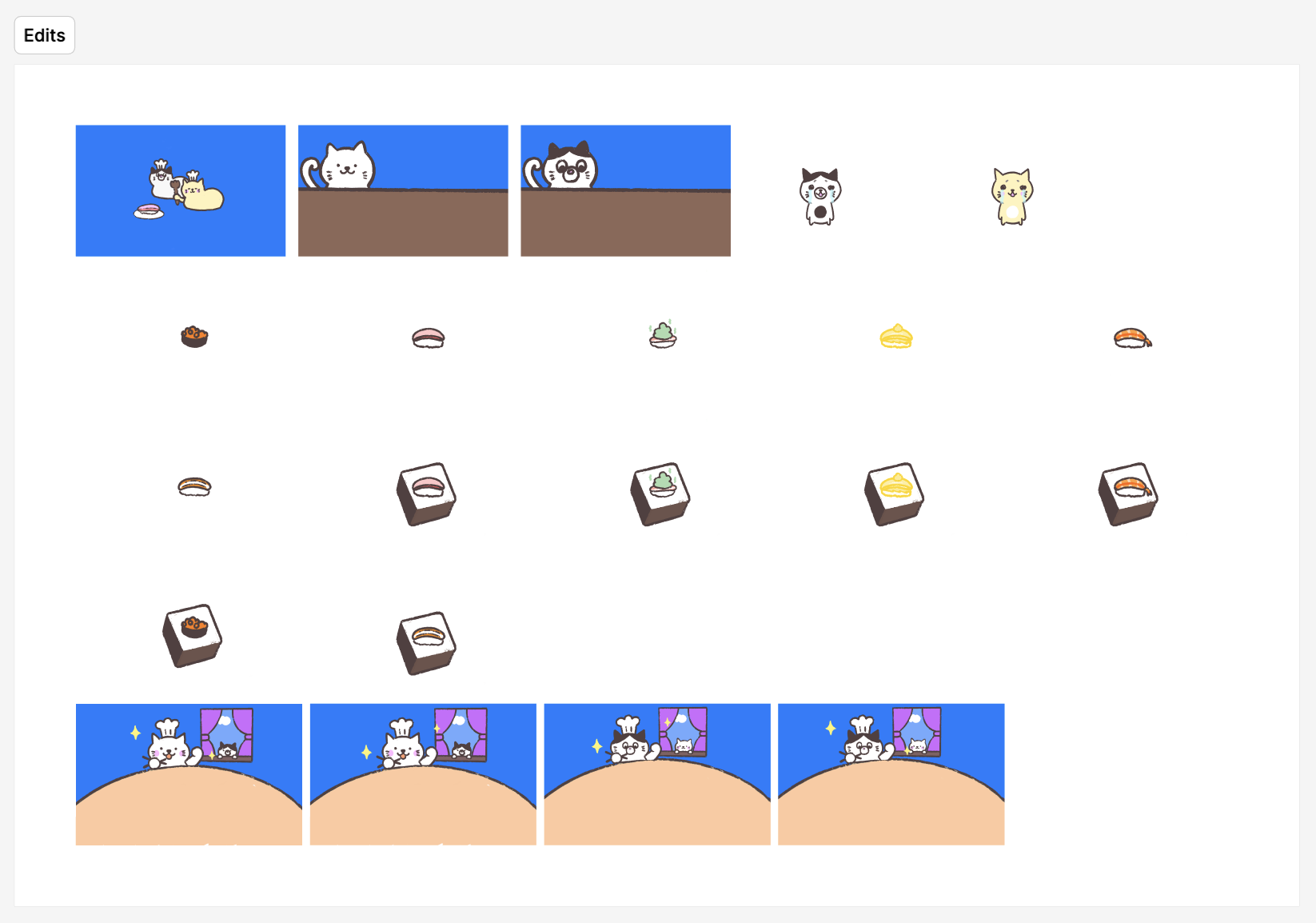
Visual Design Changes
For this extra credit revision, I wanted to make the Cat Sushi game feel more complete, so I focused on improving the visuals and adding little moments of personality throughout the gameplay. One of the biggest changes I made was creating special graphics for rolling a 1 or a 6, and implementing it into the ending screen.
For the number 6 roll (the highest and best roll), I designed a premium "Gold Sushi" graphic which is basically a golden colored sushi which I plan to add sparkle effects later on. This is the legendary sushi and will stand out from the regular sushi pieces, making players feel rewarded when they roll a 6, which is also the highest value you can roll from the dice.
For the number 1 roll (which ends a player's turn), I am creating a playful wasabi bomb character that appears when players roll the "bad" number. It's similar to the game russian roulette and it's a game I used to play with my sisters too. Additionally, I've designed cute sad cat graphics for each player showing their reaction to the spicy wasabi, adding a humorous touch to what would otherwise be a frustrating moment. This visual feedback makes the "bad roll" more engaging and entertaining rather than just disappointing, keeping the game's lighthearted tone.
I've also updated the background graphics for both winner screens to create more space for the new sushi collection display feature. The updated layouts ensure that all collected sushi pieces can be clearly displayed without cluttering the screen or covering important visual elements. Additionally, I am creating individual sushi graphics for the collection display system. Each dice number (1-6) will have its corresponding sushi piece that players can see accumulated on their win screen, showing their complete "sushi journey" throughout the game. These graphics are consistent in style but varied enough to make each piece visually distinct and collectible. By improving the visual design, it makes the game have a more polished, professional appearance while adding layers of visual storytelling that make the game more engaging and memorable.
UX/UI Usability Testing Report
Test Participants
I conducted usability tests with two of my sisters, who fit perfectly into the target audience for this game. Both are college-aged students (ages 19 and 22) who enjoy casual gaming and frequently play mobile and browser-based games with friends. They represent the ideal demographic for Cat Sushi Game: young adults looking for quick, fun, multiplayer experiences that don't require extensive gaming knowledge or time commitment.
Participant 1: Angelique (Age 22)
Background: College senior, casual mobile gamer, plays party games with friends regularly
Gaming Experience: Moderate - enjoys Mario Party, Among Us, and casual mobile games
Participant 2: Chloe (Age 19)
Background: College sophomore, enjoys cute aesthetic games, plays games socially
Gaming Experience: Light - prefers simple, visually appealing games like Animal Crossing
Executive Summary
Two usability tests were conducted to evaluate the Cat Sushi Game's user experience and interface design. Both participants successfully completed the core gameplay loop (rolling dice, passing turns, winning the game), but encountered confusion around the scoring mechanics and the consequences of rolling a 1. The testing revealed that while the visual design is appealing and intuitive, clearer feedback and instructions are needed for first-time players. Key findings suggest improving the tutorial system and adding more visual cues during critical game moments.
Test Methodology
Each participant was given minimal instructions: "Play this two-player dice game with the goal of reaching 20 points first." I observed silently as they navigated the game, taking notes on moments of confusion, delight, and frustration. Tests were conducted in person, allowing me to see exactly what the participants clicked and how long they spent on each screen. Each session lasted approximately 5-10 minutes.
Test Tasks:
- Start a new game
- Understand the game rules without external explanation
- Successfully complete a turn (roll dice and either pass or continue rolling)
- React to rolling a 1 and losing points
- Reach the win condition and restart the game
Key Findings
What Worked Well
- Visual Appeal: Both participants immediately commented on how "cute" and "fun" the cat and sushi graphics were. The aesthetic drew them in and made them excited to play.
- Button Clarity: The "ROLL" and "PASS" buttons were immediately understood. No hesitation on what actions were available.
- Score Display: Participants easily found and understood the score counters for both players.
- "How to Play" Button: Both participants clicked the "How to Play" button before starting, indicating good discoverability of the tutorial.
- Winner Screen: The celebration animation and clear "PLAYER X WINS!" text effectively communicated victory.
Areas of Confusion
- Scoring Logic (Critical Issue): Both participants were confused about when points were added to their total score. They initially thought each roll added to a "temporary" pool that needed to be banked by pressing "PASS." In reality, points are added immediately with each roll. This led to conservative play as they tried to "save" points unnecessarily.
- Rolling a 1 Consequence: While the "OH NO! You got NO SUSHI!" popup appeared, one participant (Chloe) didn't understand that she had lost ALL her points, not just her current turn. She expected to keep her previously earned points.
- Turn Switching: When the turn switched to Player 2, both participants initially didn't realize it had switched and kept trying to click Player 1's buttons (which were disabled).
- Strategy Understanding: Neither participant understood the risk/reward of continuing to roll vs. passing, as they didn't grasp the "Game of Pig" mechanics underlying the game.
Suggestions for Improvement
- Add Score Animation: When points are added, briefly highlight or animate the score increasing to clearly show the points being added to the total.
- Clarify Point Loss on Roll of 1: Update the popup to say "All your points are lost!" and briefly show the score resetting to 0 with a sad animation.
- Better Turn Indicators: Make the current player's section pulse or glow to clearly indicate whose turn it is. Consider adding a "YOUR TURN!" text overlay briefly when turns switch.
- Tutorial Improvements: Add a brief animated tutorial or first-time player guide that demonstrates: (1) points are added immediately, (2) rolling 1 loses everything, (3) passing saves your points.
- Visual Feedback on Actions: Add more sound effects and animations for key moments (earning points, losing points, switching turns).
Usability Metrics
Task Success Rate
85%
Both participants completed most tasks, but had confusion around scoring mechanics
Time to First Roll
~45 seconds
Average time from start screen to first dice roll (including reading instructions)
Error Rate
3 errors/game
Misunderstanding when points were added; confusion about turn switching
User Satisfaction
4.5/5
Both participants enjoyed the game and said they'd play again with friends
Participant Quotes
"The cats are so cute! I love the sushi theme. But I wasn't sure if my points were saved or not when I pressed pass." - Angelique, 22
"Wait, I lost all my points? I thought I just lost this turn!" - Chloe, 19 (after rolling a 1)
"This is really fun! I want to show my roommates. Can we play with more than 2 people?" - Angelique, 22
Prototype Screenshot
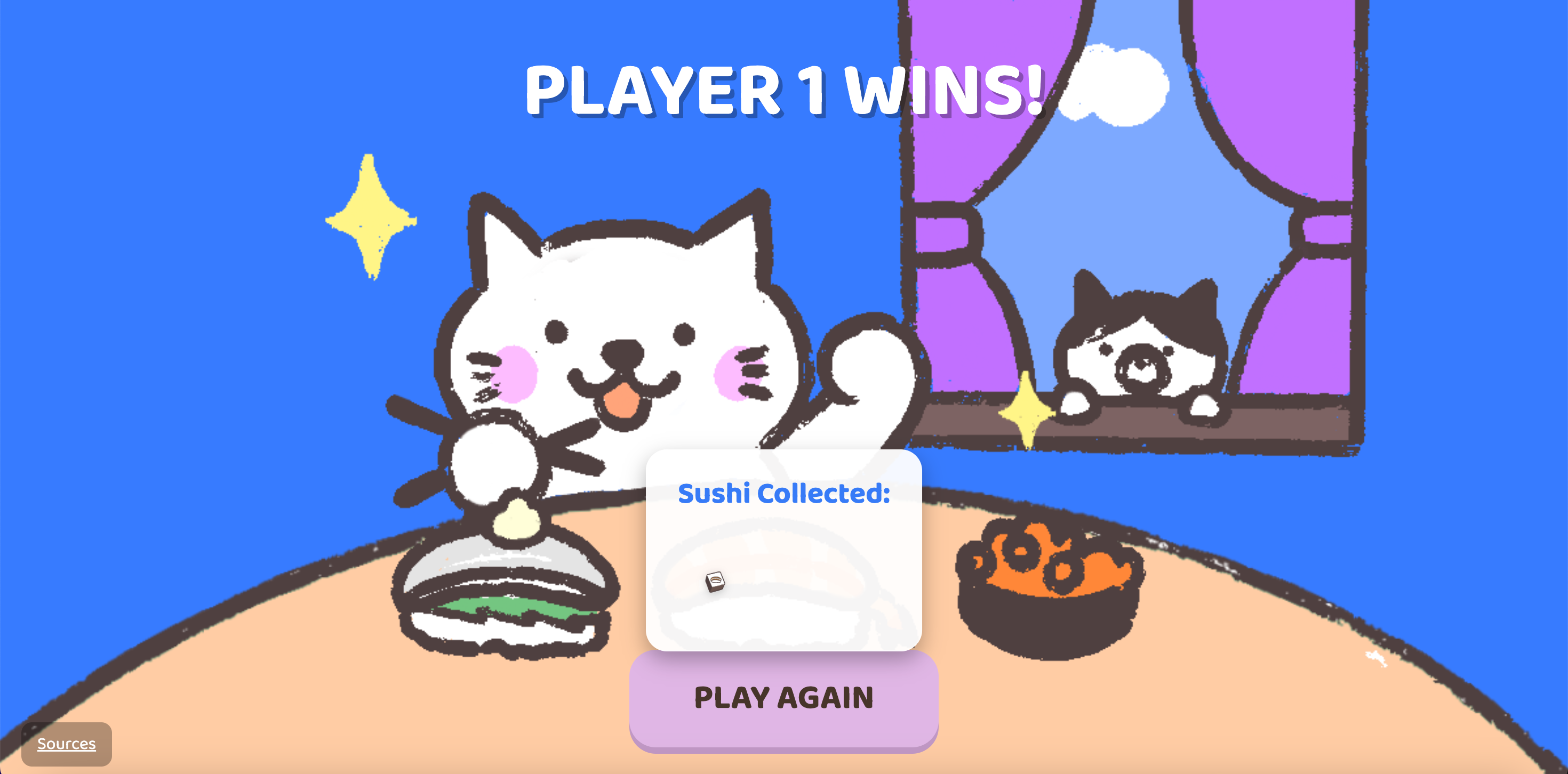
Winner screen showing the sushi collection feature displaying all collected sushi throughout the game
Conclusions & Next Steps
The usability testing revealed that while Cat Sushi Game has strong visual appeal and intuitive controls, the core game mechanics need clearer communication to players. The main issues stem from players not understanding the immediate scoring system and the full consequences of rolling a 1. These findings directly inform the next iteration of the game.
Priority Changes for Next Version:
- Add animated score counter that visibly increases when points are earned
- Enhance the "roll 1" popup to clearly state "ALL POINTS LOST" with score reset animation
- Implement stronger turn indicators (glowing border, "YOUR TURN" text)
- Create an interactive first-time tutorial that walks through one complete game round
- Add more audio and visual feedback for all major game events
With these improvements, the game will be more intuitive for first-time players while maintaining its fun, casual appeal. The positive feedback on visual design and overall enjoyment confirms that the game concept is solid and just needs clearer communication of rules and mechanics.